For multi-cam editors. macOS, native, local. 給多機位剪輯師。macOS 原生、本機運算。

Multi-cam alignment, in one drop. 多機位影像, 一拖即對。

30 min of dragging clips around → 30 sec. Drop the session folder, hit Sync, drop the XML into Premiere. 30 分鐘 手動拖拉,變成 30 秒。拖入素材夾、按下同步、把 XML 拖進 Premiere。

Buy AutoSync — $99 購買 AutoSync — $99
  • One-time purchase一次性買斷
  • 2 Mac activations2 台 Mac 啟用
  • 14-day refund14 天退款保證
  • Footage stays local素材不離開電腦
AutoSync · session_a01 READY
A01·V
B02·V
C03·V
REC·A
00:42:13:08
Drift
−0.038 ppm
Offset
128 ms
XCorr
0.997
PHAT · sub-second
★ Any number of cameras & recorders · PHAT phase-correlation · Sony XAVC synthesized TC · Rode   Zoom   Tascam   H6 · Per-camera drift compensation · Recorder pre-pass · FCP7 XML · Premiere Pro · DaVinci Resolve · DJI drone audio · 1h+ rescue · macOS native
The afternoon you don't get back那個拿不回來的下午

Premiere's built-in sync never quite works. Other tools want every track hand-assigned. Premiere 內建的同步功能,從來沒真正對準過。其他工具要你先手動把每條軌道分配好,才肯動。

You shot a 5-cam interview, a documentary, a podcast conversation. You sit down — and the cut hasn't started yet. AutoSync is the bit between "I shot it" and "I'm cutting". 你拍完 5 機位訪談、紀錄片、Podcast 對談,回到剪輯桌前,卻發現剪輯還沒開始。AutoSync 就是「拍完」到「開剪」之間,那塊每個人都討厭的工。

The 60× speedup快 60 倍的差距

What used to be an afternoon, in one drop. 原本花一個下午的工,變成一拖。

Without AutoSync沒有 AutoSync
before
~30
minutes per session分鐘 / 每次
  • ·Assign tracks manually, clip by clip手動分配每一段軌道
  • ·Nudge frames after drift accumulates累積漂移後再回去微調幀
  • ·Field-recorder splits don't auto-join連續錄音分段不會自動接
With AutoSync用 AutoSync
after
~30
seconds per session秒 / 每次
  • Drop session folder, no track assignment拖入素材夾,免分配軌道
  • Drift compensated per camera, automatically逐機自動補償漂移
  • Continuous-recorder splits joined & trimmed連續錄音分段自動接合 + trim
How it works使用流程

Three steps. Zero track assignment. 三步。不用分配軌道。

01
drop

Drop the folder拖入素材夾

Organize by source — CamA, CamB, audio recorders, drone audio each in its own subfolder — then drop the whole session folder onto AutoSync. 各素材依來源分子資料夾 — CamA、CamB、外接錄音機、空拍機音訊各自一夾 — 整個 session 母資料夾拖到 AutoSync 視窗上。

02
analyze

Hit Sync按下 Sync

PHAT runs phase-correlation across audio tracks. Drift compensation kicks in. Audio recorders align to each other first, then anchor to video. PHAT 在所有音訊軌之間做相位相關。漂移補償自動啟動。外接錄音機先互相對齊,再錨定到視訊軌。

03
cut

Drop XML into Premiere把 XML 拖進 Premiere

Out comes an FCP7 XML. Drop it into Premiere Pro or DaVinci Resolve and start cutting. 輸出 FCP7 XML,直接拖進 Premiere Pro 或 DaVinci Resolve,立刻開剪。

<xmeml>
<sequence>
// all tracks aligned
offset="128ms"
</sequence>
</xmeml>
What you get實際畫面

Five screens, one drop. 5 個畫面,1 次拖入。

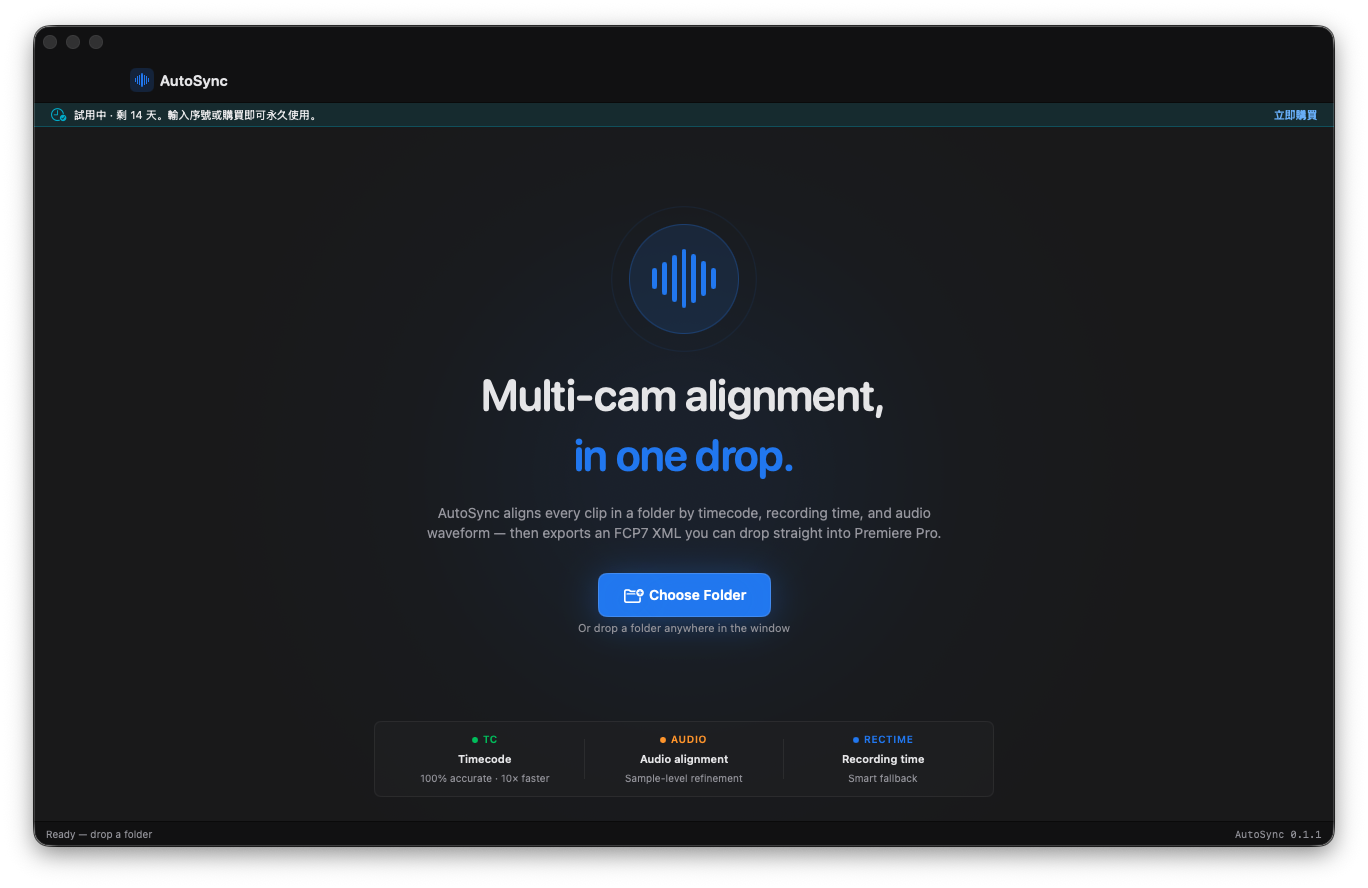
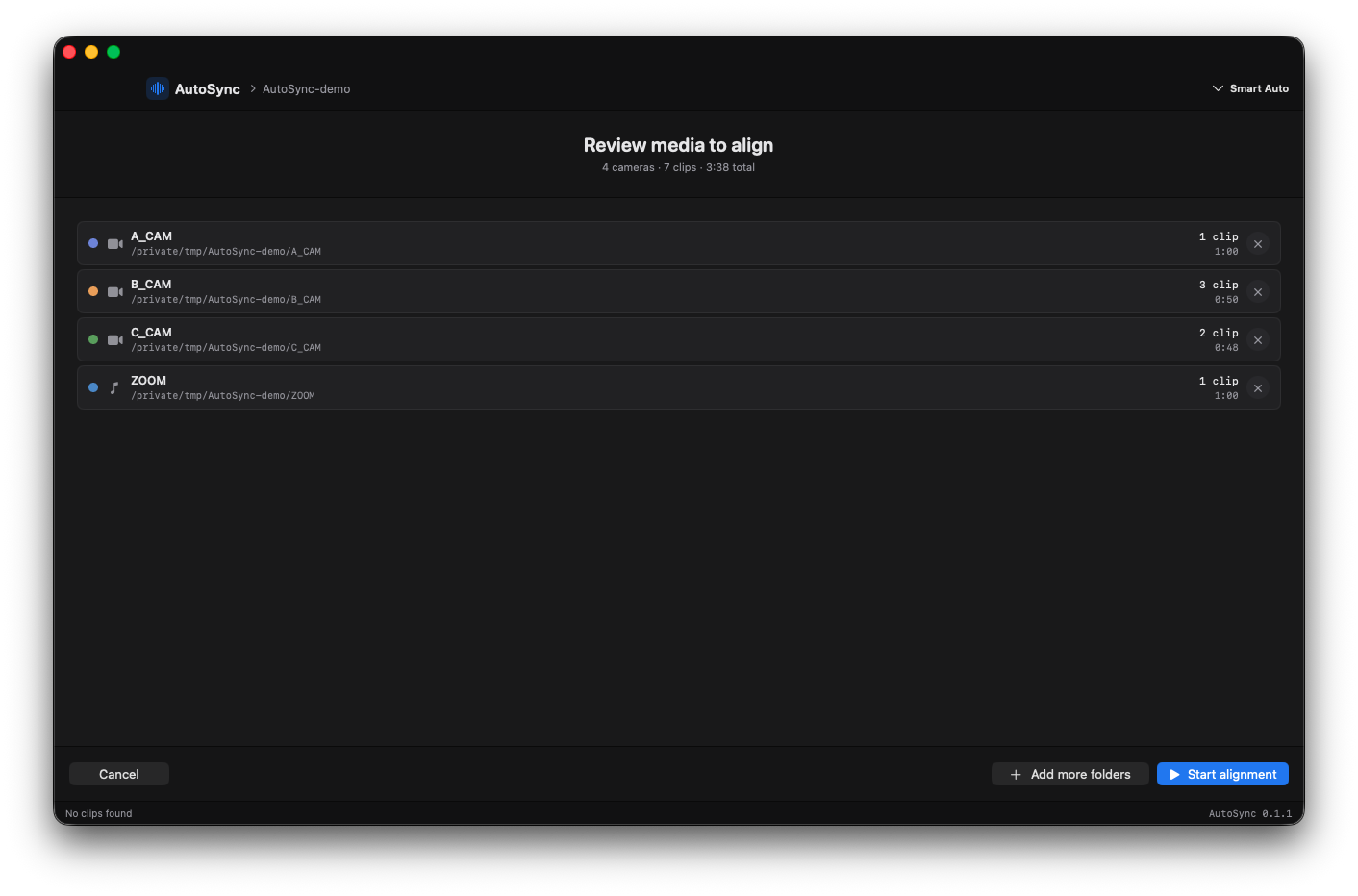
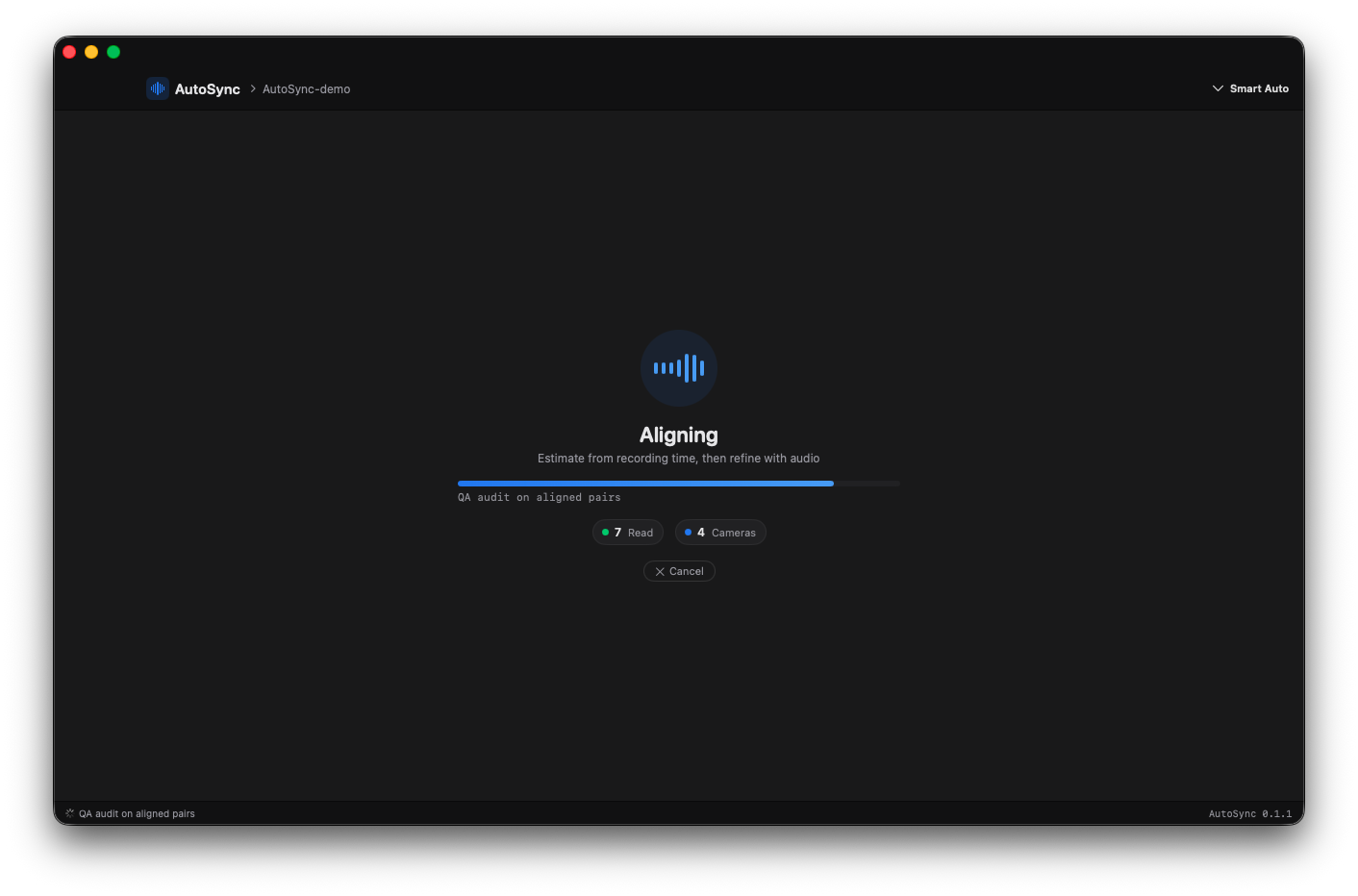
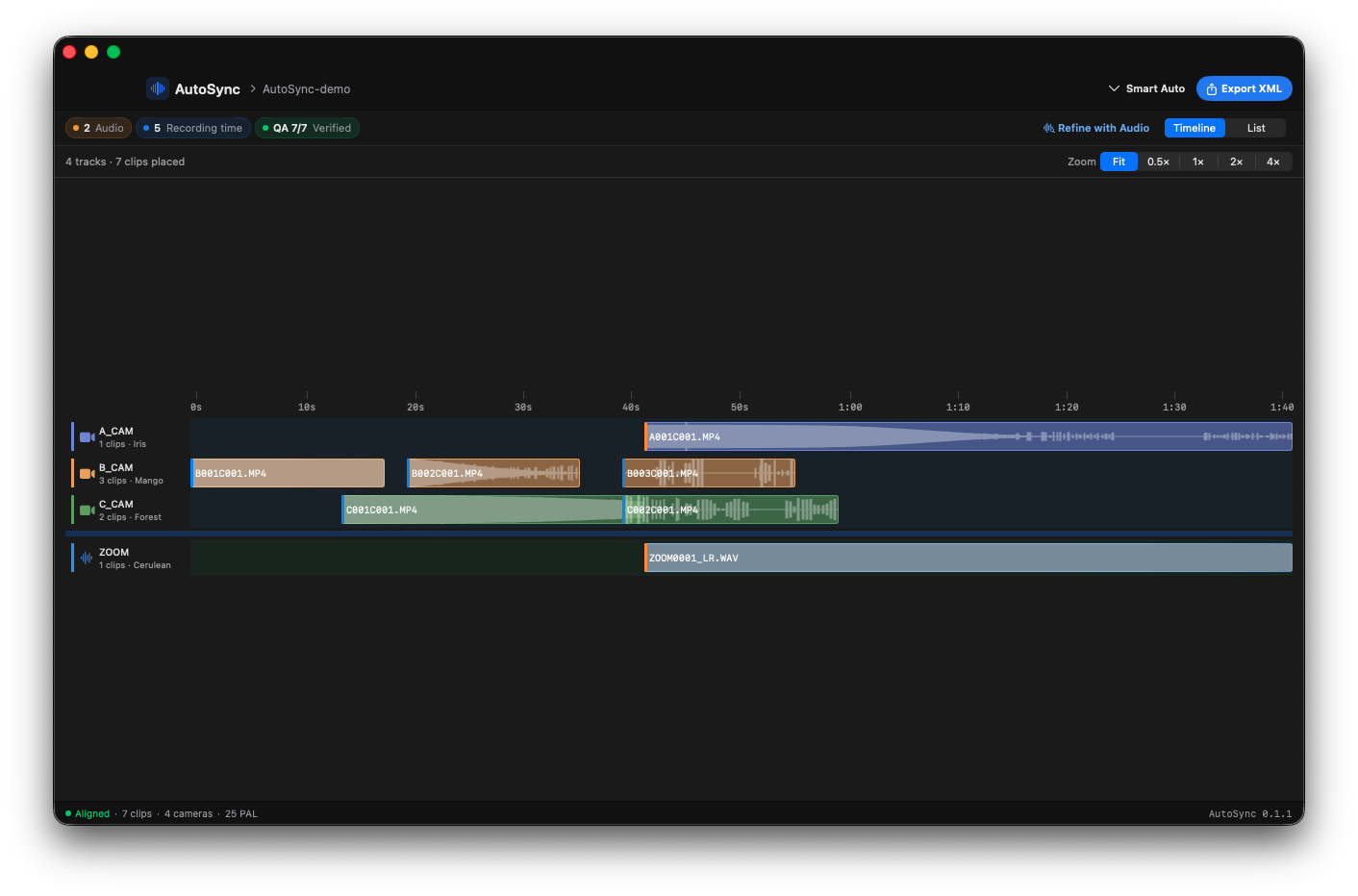
From the moment you drop the session folder to the moment you drag the XML into Premiere — every screen, exactly how it looks on your Mac. 4 cameras, 7 clips (some with mid-shoot stops and restarts), one continuous audio recorder. 從拖入素材資料夾到把 XML 拖進 Premiere,每一個畫面都是你的 Mac 實際看到的樣子。4 機位、7 個 clip(有些拍到一半停了、再開),一支錄音機整場跑滿。

AutoSync welcome screen with drop-target for the session folder
01 · Welcome — drop the session folder 起點 — 拖入素材資料夾
Review screen listing 4 tracks and 7 clips ready to align
02 · Review — confirm what's about to sync 預覽 — 確認要對齊的素材
Sync in progress with PHAT phase-correlation refinement running
03 · Syncing — PHAT phase-correlation runs 對齊中 — PHAT 相位相關運算
Timeline view with 4 cameras, 7 aligned clips, QA 7 out of 7 verified
04 · Timeline — everything aligned, ready to export 時間軸 — 全部對齊,準備匯出
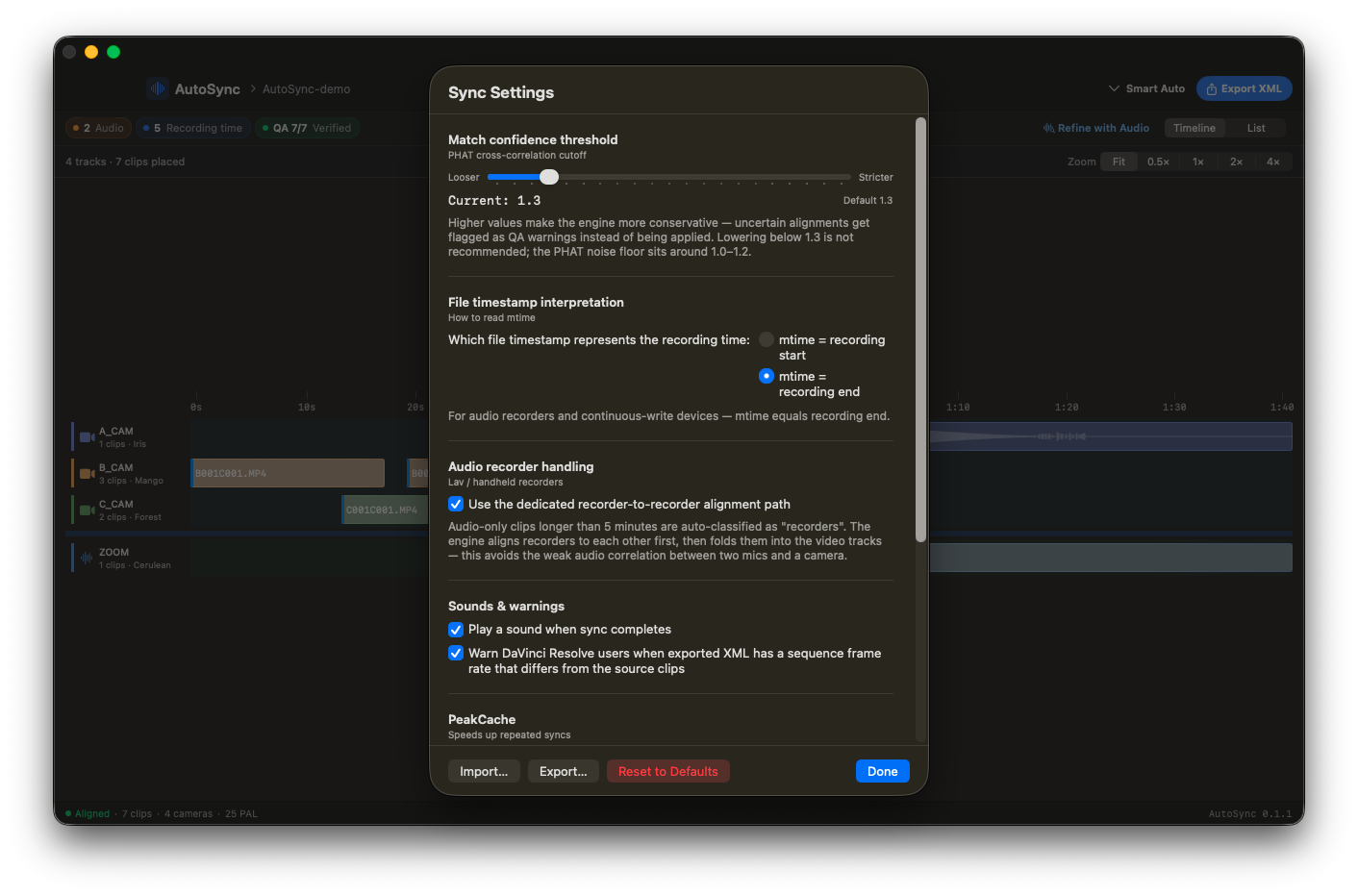
Sync settings sheet showing alignment thresholds and locale preferences
05 · Settings — tune thresholds when you need to 設定 — 需要時調整門檻
What's inside內建的東西

Built by an editor who got tired of nudging clips. 剪輯師自己受不了,寫給自己用的工具。

Any number of cameras不限機位數量

2 cams or 20. PHAT phase-correlation runs across every audio track in the session. Sub-second precision, no manual pairing. 2 機還是 20 機都沒差。PHAT 相位相關會跑過 session 裡每一條音訊軌,sub-second 精度,不必手動配對。

Field recorder handling錄音機原生支援

Rode, Zoom, Tascam. Auto-segmented continuous recordings get boundary overlap detection + auto-trim. Rode / Zoom / Tascam 全支援。自動分段的連續錄音檔,有 boundary overlap 偵測 + 自動 trim。

Per-camera clock drift逐機位時鐘漂移

Crystal drift detected and compensated per source — so 60-minute takes stay in sync to the last frame. 每台機器晶振漂移自動偵測 + 補償。一小時的 take,最後一格也不會 drift。

Recorder pre-pass錄音機專用路徑

Audio recorders aligned to each other first, then anchored to video. Eliminates the subtle echo most tools miss. 外接錄音機先互相對齊,再錨定到視訊。大多數工具抓不到的細微回音,這樣才會真正消掉。

Sony XAVC synthesized TCSony XAVC 合成時間碼

Reads timecode from Sony XAVC even when AVFoundation can't. No more "no timecode track" detours. 就算 AVFoundation 讀不到 timecode,我們也能合成出來。不用再繞路。

FCP7 XML output輸出 FCP7 XML

Drag straight into Premiere Pro or DaVinci Resolve. No round-trip through Final Cut required. 直接拖進 Premiere Pro / DaVinci Resolve。不用透過 Final Cut 中轉。

Edge cases already covered那些其他工具拒絕的素材

DJI drone audio. Audio-only tracks. Long-form 1-hour+ session rescue when other tools time out. AutoSync handles them by default — they're not behind a setting. DJI 空拍機音訊、純音訊軌、1 小時以上長片 rescue — 其他工具會 time out,AutoSync 預設就吃得下,不用開設定。

vs. the usual options對照其他做法

What 30 minutes of nudging really costs. 30 分鐘手動拖拉,真正的代價是什麼。

AutoSync Premiere built-inPremiere 內建
Track assignment軌道分配 None — drop folder不用 — 直接拖 Per-clip, manual每段手動
Clock drift correction時鐘漂移修正 Per-camera, automatic逐機自動補償
Recorder pre-pass錄音機預先對齊 Built-in內建
Sony XAVC timecodeSony XAVC TC Synthesized when missing讀不到時自己合成 Often missing常常讀不到
1h+ long-form長片 (1h+) Designed for it原本就為它寫的 Often hangs常 hang
Your footage你的素材 Stays on your Mac留在你的 Mac Stays local留在本機
Time per session每次花的時間 ~30 sec 5–15 min
99USD
One-time. No subscription.一次性。沒有訂閱。
2
Mac activations per key.一組 key,2 台 Mac。
14days
Refund, no questions.退款,無需理由。
Lifetime minor updates.小版更新終身免費。
One drop. One price.一拖。一價。
$99
USD · one-time美金 · 一次買斷
  • Full app, no feature gates完整 App,不分版本
  • 2 Mac activations per key一組 key 啟用 2 台 Mac
  • Lifetime minor updates小版更新終身免費
  • Offline use (7-day grace)可離線使用 (7 天寬限)
  • 14-day refund, no questions14 天退款,無需理由
  • Footage never leaves your Mac素材全程不離開電腦
Buy AutoSync — get your license now 立即購買 AutoSync — 領取序號
Secure checkout by Gumroad · macOS 13+ · Apple Silicon & Intel Gumroad 安全結帳 · macOS 13+ · Apple Silicon & Intel

By purchasing, you agree to our Terms and Privacy Policy. 購買即代表同意我們的服務條款隱私權政策

The actual questions實際會問的問題

FAQ常見問題

Does the footage leave my machine?素材會離開我的電腦嗎? +

No. AutoSync analyzes everything locally on your Mac. Files never get uploaded, and AutoSync doesn't need a network connection to run a sync. 不會。AutoSync 全程在你的 Mac 上分析,檔案不會上傳,執行同步也不用連網。

I shoot Sony A7 / FX3. Will it read my timecode?我拍 Sony A7 / FX3,時間碼能讀嗎? +

Yes. Sony XAVC files often have timecode that AVFoundation can't decode — AutoSync synthesizes it directly from the file structure so the sync still works. 可以。Sony XAVC 的 timecode 有時 AVFoundation 讀不到,AutoSync 會從檔案結構自己合成出來,同步照樣跑。

Premiere or DaVinci Resolve?Premiere 還是 DaVinci Resolve? +

Both. AutoSync writes FCP7 XML, which Premiere Pro and DaVinci Resolve both import natively. No Final Cut Pro required. 兩個都可以。AutoSync 輸出 FCP7 XML,Premiere Pro 和 DaVinci Resolve 都能直接匯入,不需要 Final Cut Pro。

What about my second Mac?第二台 Mac 怎麼算? +

One key activates up to 2 Macs — your own personal devices (e.g. studio + laptop). Switching machines is one click: License Status → Sign out of this machine releases the slot instantly. 一組 key 可以啟用最多 2 台你自己的 Mac (例如:工作室那台 + 帶出門的筆電)。換機只要一個動作:授權狀態 → 登出此機器,額度立刻釋出。

What if it doesn't work for my session?如果對我的素材沒效呢? +

14-day refund, no questions asked, refunded through Gumroad — your license is deactivated automatically. Email service@resonaframe.com if you'd like me to look at the session first. 14 天內可全額退款,無需理由,直接透過 Gumroad — key 會自動失效。如果想先讓我看看 session,寫信到 service@resonaframe.com

Updates?更新怎麼處理? +

AutoSync uses Sparkle for in-app updates. When a new minor version ships, you get a prompt — included for life. AutoSync 用 Sparkle 做 in-app 更新。每次小版發布會自動跳通知 — 終身免費。

Ready when you drop it等你拖進來

Get the afternoon back. 把你的下午拿回來。

One-time $99. Two Macs. Lifetime minor updates. 14-day refund. $99 一次買斷。兩台 Mac。小版更新終身免費。14 天退款。

Buy AutoSync — $99 購買 AutoSync — $99

By purchasing, you agree to our Terms and Privacy Policy. 購買即代表同意我們的服務條款隱私權政策

AutoSync · $99
One drop. One XML. Done.一拖。一個 XML。搞定。
Buy購買
Sync · live demo
CAM A
CAM B
CAM C
REC
Ready. Press Sync.

Schematic preview only. The real sync runs against your audio waveforms at sub-second precision.示意動畫。實際同步會在你的音訊軌上做 sub-second 精度的對齊。

License summary授權摘要

One key, up to 2 Macs. Both must be your own personal devices.一組 key,最多 2 台 Mac。必須是你自己的個人裝置。

Switching machines. AutoSync → License Status… → Sign out of this machine. Slot is released immediately.換機。AutoSync → 授權狀態… → 登出此機器,額度立刻釋出。

Silent verification. A background check runs once every 14 days.背景驗證。每 14 天靜默驗證一次。

Offline. Supported. 7-day grace if AutoSync can't reach the server — up to 21 days offline continuously, then one successful connection resets the cycle.離線。支援。連不上網有 7 天寬限,即最多可連續離線 21 天;之後連網成功一次,週期重置。

Updates. Lifetime minor updates included via in-app Sparkle.更新。小版更新終身免費,由 in-app Sparkle 推送。

Refund. 14 days, no questions, via Gumroad. License auto-deactivates on refund.退費。14 天內透過 Gumroad 全額退款,無需理由。退款後 key 自動失效。

Full legal text: Terms of Service · Privacy Policy · End User License Agreement bundled inside the App (Help → 授權合約). 完整法律條文:服務條款 · 隱私權政策 · 使用者授權合約 (EULA) 已內附於 App 內 (Help → 授權合約)。

By purchasing AutoSync, you agree to the Terms of Service and acknowledge the Privacy Policy linked above. 購買 AutoSync 即代表同意上述「服務條款」並確認知悉「隱私權政策」。